My AU London 2018 Class: Need for Speed: 102 Productivity Hacks for Inventor, is now live on the AU portal. See the video of my session below. https://youtu.be/doNSgEpFTXo You can find the other classes here: KEY LEARNING Discover 102 Inventor tips and tricks Setting Application Options Create and run iLogic rules Set up Inventor templates... Continue Reading →
Inventor Quick Tip: Sketch Region Properties
Within the "Sketch" environment in Autodesk Inventor, there is a really handy "Region Properties" tool which calculates properties of selected sketch regions. The calculations performed are; Area, Perimeter, Centroid, Inertia Tensor, Polar Moment of Inertia, Area Moments of Inertia and Radii of Gyration. To access "Region Properties", you must have a sketch active (i.e. you need to be editing... Continue Reading →
Electro-Mechanical Workflows can be easy!
In traditional engineering design processes, electrical and mechanical design workflows have often been separate from each other. This has mainly been down to the tool sets used to create these designs. The Autodesk Product Design & Manufacturing Collection changes all of this. It comes packed with tools that make collaboration between electrical and mechanical teams... Continue Reading →
Blog Archive
Below is a set of links to my 228 blog posts on Cadline Community. There are even more in the archives, the list below dates back to the 2012 product releases, so should go far enough back. Enjoy! Vault: Improve Collaboration with Shared Views Use Cadline Connect to Manage Your Vault PDFs Inventor - Quick... Continue Reading →
AU London 2018 Preview
If you're headed to Autodesk University London this year, and are an Inventor or Vault user, you may be interested in the 2 sessions that I am running. The first once is called "Extending Autodesk Vault". The aim of the class, is to show how to add functionality to Vault, using a tool called "Cadline... Continue Reading →
Structural Calculations in Autodesk Inventor?
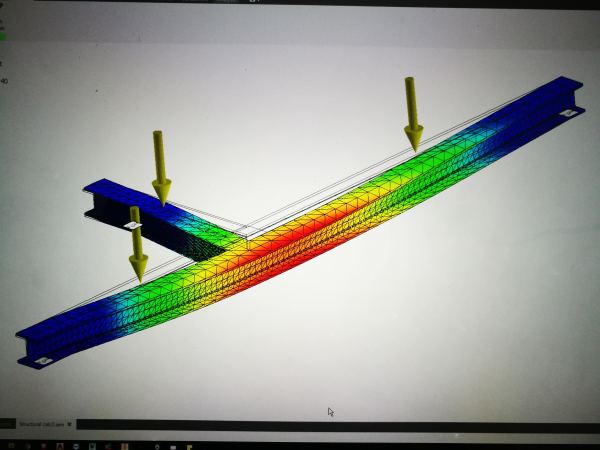
We are about half way through having an extension added to our home. A lot of the project has involved structural work and some pretty heavy steel work. I employed a structural engineer to do all of the calculations and specify the steel beams that are ultimately going to support the structure. The scary part... Continue Reading →
Autodesk 2019 – 2020 & 2021 Product keys
Product keys are required for installation of Autodesk products and are used to differentiate products that are both sold independently and as part of a product suite. For example, installing AutoCAD 2019 as a point product requires product key 001K1, but installing AutoCAD 2019 from the AutoCAD Design Suite Premium 2019 requires product key 768K1.... Continue Reading →
You must be logged in to post a comment.