It's update time! The Jan/Feb release of Fusion 360 has 3 great updates to the drawings environment. We've updated our welding standard for ANSI users. The latest AWS welding standard is now available to choose in Document Settings. Our welding dialogue now shows the standard in use. Hole & Thread notes have had a HUGE... Continue Reading →
Setting up 3rd Angle ISO Templates
By default, ISO templates in Fusion 360 use 1st Angle projection. Setting up 3rd Angle drawing templates is really simple. The video below outlines the steps to set up a 3rd Angle drawing template in Fusion 360. https://youtu.be/hd3MzcuFRKg
Fusion Drawings Wrapped 2021
We've had a busy year on the Fusion 360 drawings team, below is a video showing the customer facing enhancements that we made in 2021. https://youtu.be/CT5UqwpH38o We have a lot planned in 2022. As we mature the drawings workspace, we will be adding even more functionality. If you'd like to get in touch to discuss... Continue Reading →
Nov/Dec New Drawing Features
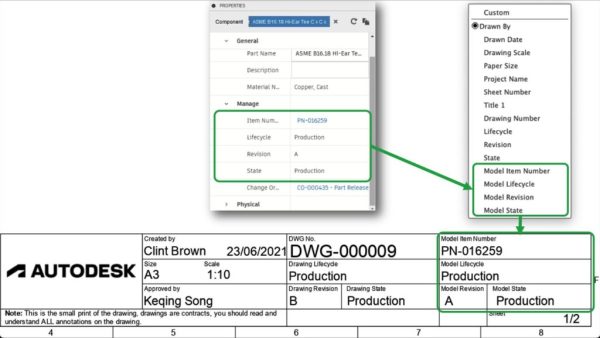
The November/December Fusion 360 update has some really nice enhancements for Manage Extension users, we now support additional Manage Extension Properties in the title block, check out the official Fusion 360 blog for more on this. Improvements and Bug fixes: In addition to the new features mentioned above, the team spent a large portion of... Continue Reading →
September Drawing Enhancements
I recently wrote a blog post for the official Fusion 360 blog, outlining some of the latest features that we added to the last release of Fusion 360. I thought I'd share a video of the new tools in this blog post. The main features that we added in the September release were: Arrange Dimensions... Continue Reading →
Unicode Reference for Extra Symbols
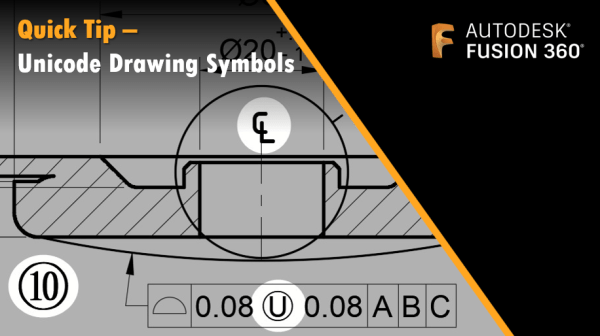
You may need to include additional symbols on your drawings in Fusion 360. The good news, is that we support Unicode symbols. If you're looking to add a symbol like the "Unequally disposed profile" Ⓤ, or a symbol that is not part of the standard Fusion palette, the tables below have got you covered. Simply... Continue Reading →
Edit Balloon Sizes & Text Heights
In the August update to Fusion 360 we added control over Text Height Groups. This enhancement give users control over the text based annotations on drawings, including Balloons! The default setting for Text Height Groups is "Medium", changing this to "Small", or "Large" with scale all text elements down or up proportionally. Dimension arrows, text... Continue Reading →
Fusion 360 August Drawing Updates
In the Fusion 360 August 2021 updates, we added several enhancements. Text Height Group - control balloon sizes, text sizes etc.Line Weights Group - more control over line weights, (with custom options)Grips overhaul - we removed redundant grips and aligned grips with the sketch environment Check out the video showing an overview of the new... Continue Reading →
Fusion 360 Quick Tip: Editing Parts Lists
If you have ever wanted to hide specific rows in your parts list, then this is the quick tip for you! The video below shows how you can hide rows and re-number items. https://youtu.be/thjXodr5OlY UPDATE: Here's a quick follow-up video, just in case you're looking for more flexibility around all-level parts lists, in this video... Continue Reading →
Switching Title Blocks
In the drawings environment it is possible to import a title block from another template file (note I said template, not drawing). So you're looking to update your title block, or to swap your title block for a newer one, the good news is that there is a really simple way to do this. You... Continue Reading →
You must be logged in to post a comment.