AU London 2020 has been postponed, I received this email from Autodesk, check out the FAQ Below. The new dates are 1-2 December 2020. Find out more here: https://www.autodesk.com/autodesk-university/faq
Autodesk University London 2020 #AULondon

Fusion 360 Blog
AU London 2020 has been postponed, I received this email from Autodesk, check out the FAQ Below. The new dates are 1-2 December 2020. Find out more here: https://www.autodesk.com/autodesk-university/faq

If you use AutoCAD, Revit, Inventor, Fusion360, Vault, or pretty much any of the main stream Autodesk products, you will have at some stage used an Autodesk cloud service. To help understand any planned maintenance or outages, Autodesk have created a "Health Dashboard", which shows the current status of all cloud services, as well as... Continue Reading →
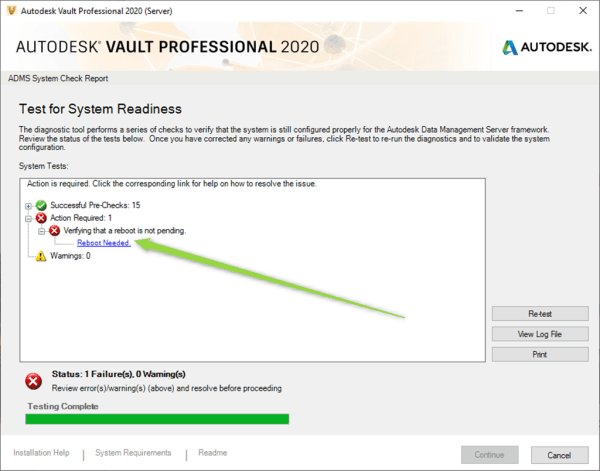
In some installations of the Vault server, the "Reboot Needed" error will show on the installer pre-checks. If you have rebooted the server, and the pre-checker still shows this, the steps below will bypass the checker and proceed with the installation of Vault Server. NOTE: This method should be used as a last resort. You... Continue Reading →

Vault 2020 is now available, this release features updates to the Vault Sync tool, as well as Copy Design and some improved functionality around PDF's. Below are 3 videos highlighting the new features: New features in Project Sync: https://www.youtube.com/watch?v=RwyVbnPYX4I&feature=youtu.be New Features in Copy Design: https://youtu.be/lDQuh3k8wyw 2020 PDF Enhancements: https://youtu.be/dQpT-fiRlh4

You may have the Autodesk Vault Client installed on your CAD workstation, but find that the product specific add-ins are not installed. This is pretty simple to resolve, the steps laid out below show how I recently added the Vault add-ins for MS Outlook and AutoCAD Electrical to my system. Step one, go to "Apps... Continue Reading →

Autodesk Vault has some very powerful search functionality built in, and with a few extra tricks up our sleeve, you can become a search Jedi! Here are a few things you can try. Try *. to find files of a specific extension: eg: *.ipt will find all part files, *.iam will find all assembly files Try... Continue Reading →

The "Sync properties not allowed on non-tip versions" error message in Autodesk Vault has been known to cause a bit of a panic with Vault Administrators, as it sounds very serious and re-submitting the failed job does not resolve it. So what does "Sync properties not allowed on non-tip versions" mean? Basically, the job processor... Continue Reading →

The Vault Job processor may from time to time throw an error, and the list below may come in handy. This list is usually published in the SDK folder, which most users will not have on their Vault servers, so this may prove to be a handy resource to bookmark. Code Name Comments 0 UnspecifiedSystemException... Continue Reading →

Below is a set of links to my 228 blog posts on Cadline Community. There are even more in the archives, the list below dates back to the 2012 product releases, so should go far enough back. Enjoy! Vault: Improve Collaboration with Shared Views Use Cadline Connect to Manage Your Vault PDFs Inventor - Quick... Continue Reading →

If you're headed to Autodesk University London this year, and are an Inventor or Vault user, you may be interested in the 2 sessions that I am running. The first once is called "Extending Autodesk Vault". The aim of the class, is to show how to add functionality to Vault, using a tool called "Cadline... Continue Reading →
 Clint Brown
You must be logged in to post a comment.