Guest Post by M Veldkamp

Here’s a solution to a problem that isn’t really a problem.
You want to take screenshots of your model for a presentation, but your inventor background is a blue gradient.
You can of course go through the hassle of changing your settings manually but why bother if you can do it via iLogic!
When you run the rule the first time it will ask you what your preferred colour scheme is and will select your current scheme for convenience.
After that, running the rule will toggle your background colour between white and the chosen option.
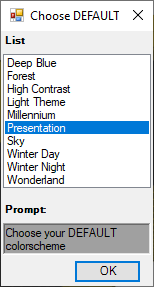

Below is a copy of the iLogic rule with comments to make it easy to follow.
Imports System.IO
'HEADER
Class BackgroundSwapper
	'[This rule was written By M. Veldkamp In late 2019
	']You can change the location Of the settingsfile down below.

	'We want to declare the StandardFile outside of Main() so we can use it in other functions as well.
	Dim StandardFile As String = ("C:\TEMP\InventorBackGroundSettings.txt")
	'We also want to know the current applied colorscheme
	Dim CurrentColorScheme As String

	Sub Main()
		'Main is the program that contains all our understandable logic.
		'We want to ignore errors. And continue to the next line if somethings awry
		On Error Resume Next
		CurrentColorScheme = ThisApplication.ActiveColorScheme.Name
		'We are going to declare a string and input ReadSettings() into it.
		Dim DefaultSetting As String

		'We want to check if the file StandardFile exists before we do anything.
		If System.IO.File.Exists(StandardFile) Then
    		'The file exists! Read the contents of that file and input it in DefaultSetting.
			DefaultSetting = ReadSettings
    	Else
			'The file does not exist. Make the settingsfile and input that value into DefaultSetting.
   			DefaultSetting = MakeSettings
		End If

		'[Our logic is a simple 'if' statement:
		'If the background is white, change to the Default settings.
		']If it's already the default setting we change to White instead

		If CurrentColorScheme = "Presentation"
			'The current applied colorscheme is now Presentation. Return the settings to the Default chosen setting.
			ThisApplication.ColorSchemes(DefaultSetting).Activate
			ThisApplication.ColorSchemes.BackgroundType = 52738 'The background consists of a color gradient.
		Else
			'DefaultSetting is active. Toggle to Presentation and set the color to a single color... white.
			ThisApplication.ColorSchemes("Presentation").Activate
			ThisApplication.ColorSchemes.BackgroundType = 52737 'The background consists of one color.
		End If
		'END OF MAIN() what follows are functions that we called earlier.
	End Sub

	Function ReadSettings
		'Read the contents of the fie,
		On Error Resume Next

		Dim Read As New StreamReader(StandardFile)
		Dim bLine As String = Read.ReadLine()
		Read.Close()
		Return bLine

	End Function

	Function MakeSettings
		'There is no file yet. We need to collect information from the user, make a new file and input that collected information in that file.
		Dim ListChoices As New ArrayList
			ListChoices.Add("Deep Blue")
			ListChoices.Add("Forest")
			ListChoices.Add("High Contrast")
			ListChoices.Add("Light Theme")
			ListChoices.Add("Millennium")
			ListChoices.Add("Presentation")
			ListChoices.Add("Sky")
			ListChoices.Add("Winter Day")
			ListChoices.Add("Winter Night")
			ListChoices.Add("Wonderland")
			'ListChoices.Add("Your Custom ColorScheme name here")

		YourDefaultSettings = InputListBox("Choose your DEFAULT colorscheme", ListChoices, CurrentColorScheme, Title := "Choose DEFAULT")

		fso = CreateObject("Scripting.FileSystemObject")
		StandardBackground = fso.CreateTextFile(StandardFile, True)
		StandardBackground.WriteLine(YourDefaultSettings)
		StandardBackground.Close
		Return YourDefaultSettings

	End Function
End Class
Here is a version of the iLogic rule with no comments (for the more advanced user).
'HEADER
Imports System.IO
Class BackgroundSwapper
	'[This rule was written By M. Veldkamp In late 2019
	']You can change the location Of the settingsfile down below.

	Dim StandardFile As String = ("C:\TEMP\InventorBackGroundSettings.txt")
	Dim CurrentColorScheme As String

	Sub Main()

		On Error Resume Next
		CurrentColorScheme = ThisApplication.ActiveColorScheme.Name

		Dim DefaultSetting As String

		If System.IO.File.Exists(StandardFile) Then
			DefaultSetting = ReadSettings
    	Else
   			DefaultSetting = MakeSettings
		End If

		If CurrentColorScheme = "Presentation"
			ThisApplication.ColorSchemes(DefaultSetting).Activate
			ThisApplication.ColorSchemes.BackgroundType = 52738 '= color gradient.
		Else
			ThisApplication.ColorSchemes("Presentation").Activate
			ThisApplication.ColorSchemes.BackgroundType = 52737 '= one color.
		End If
	End Sub

	Function ReadSettings
		On Error Resume Next

		Dim Read As New StreamReader(StandardFile)
		Dim bLine As String = Read.ReadLine()
		Read.Close()
		Return bLine

	End Function

	Function MakeSettings
		Dim ListChoices As New ArrayList
			ListChoices.Add("Deep Blue")
			ListChoices.Add("Forest")
			ListChoices.Add("High Contrast")
			ListChoices.Add("Light Theme")
			ListChoices.Add("Millennium")
			ListChoices.Add("Presentation")
			ListChoices.Add("Sky")
			ListChoices.Add("Winter Day")
			ListChoices.Add("Winter Night")
			ListChoices.Add("Wonderland")
			'ListChoices.Add("Your Custom ColorScheme name here")

		YourDefaultSettings = InputListBox("Choose your DEFAULT colorscheme", ListChoices, CurrentColorScheme, Title := "Choose DEFAULT")

		fso = CreateObject("Scripting.FileSystemObject")
		StandardBackground = fso.CreateTextFile(StandardFile, True)
		StandardBackground.WriteLine(YourDefaultSettings)
		StandardBackground.Close
		Return YourDefaultSettings

	End Function
End Class
 Clint Brown
You must be logged in to post a comment.